
Web performance optimization tips are essential in today’s digital landscape, where user experience and site speed can make or break online engagement. By focusing on optimizing various aspects of your website, you not only improve loading times but also enhance overall performance, which can lead to higher conversion rates and better search engine rankings.
In this guide, we’ll delve into practical techniques to reduce page load times, the significance of image optimization, and effective strategies for implementing browser caching. We will also explore how site speed impacts advertising performance and user engagement, along with essential security measures to ensure that your website remains both fast and secure.
Web Performance Optimization Techniques
Optimizing web performance is crucial for enhancing user experience, improving search engine rankings, and maximizing conversion rates. By implementing effective techniques, you can significantly reduce page load times and ensure that your website runs smoothly. Here, we explore key methods for web performance optimization, focusing on reducing load times, the importance of image optimization, and implementing browser caching.
Methods for Reducing Page Load Times
Reducing page load times is vital to keep users engaged and satisfied. Several techniques can be employed to achieve this goal effectively. Below are some essential strategies:
- Minimize HTTP Requests: Reduce the number of components on your page, as each request adds to load time. Combining CSS and JavaScript files can help streamline this process.
- Use Content Delivery Networks (CDNs): CDNs store copies of your website’s resources in multiple locations worldwide, ensuring faster access for users based on their geographic location.
- Enable Gzip Compression: This technique compresses files to reduce their size during transfer, leading to faster load times. Ensure your server is configured to support Gzip compression.
- Optimize CSS and JavaScript: Minifying these files by removing unnecessary spaces and comments can significantly decrease their size, contributing to faster loading.
Importance of Image Optimization for Better Performance
Images often constitute a large portion of web page weight, which can lead to slow loading times. Optimizing images is essential for improving performance and enhancing user experience. Here are the key aspects to consider:
- Choose the Right Format: Use formats like JPEG for photos and PNG for images requiring transparency. WebP is an excellent modern alternative that offers superior compression rates.
- Compress Images: Utilize tools like TinyPNG or ImageOptim to reduce image file sizes without sacrificing quality. This can lead to significant improvements in loading times.
- Implement Responsive Images: Use the
srcsetattribute in your<img>tags to serve different image sizes based on the user’s device, ensuring optimal quality and performance. - Lazy Loading: This technique defers loading images until they are about to enter the viewport, which reduces initial load time and saves bandwidth.
Step-by-Step Guide to Implementing Browser Caching
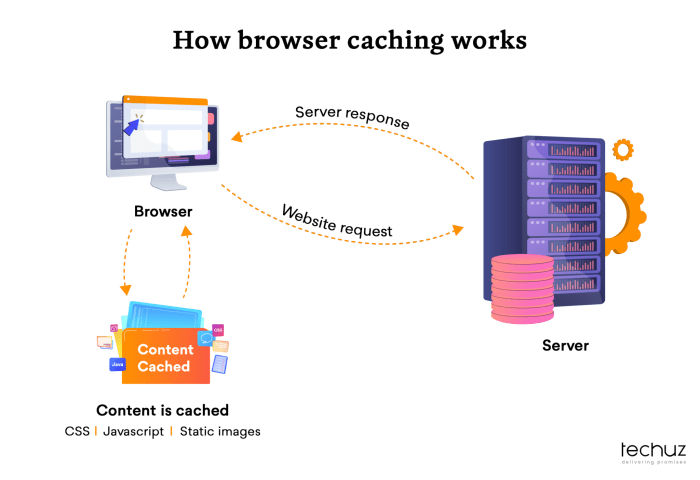
Browser caching allows frequently accessed resources to be stored locally on a user’s device, enhancing site performance. Implementing it effectively can lead to significant load time reductions. Follow these steps to set up browser caching:
- Specify Cache-Control Headers: Use HTTP headers to define how long browsers should store your assets. For instance, setting a long expiration time for images and scripts can boost performance.
- Use Expires Headers: These headers specify a date and time after which the cached resource is considered stale. This ensures that browsers request updated versions when necessary.
- Implement Cache Busting Techniques: Modify the filenames of your resources or append version numbers to the URLs to ensure browsers fetch the latest versions when changes are made.
- Leverage Tools and Plugins: Utilize tools like Google PageSpeed Insights or caching plugins for popular CMS platforms to analyze and implement efficient caching strategies.
Enhancing Site Speed for Search Engine Marketing
Improving site speed is not just a technical necessity; it’s a crucial factor for effective search engine marketing (SEM). Fast-loading sites significantly influence ad performance and user engagement, leading to improved conversion rates and overall success of marketing campaigns. In a digital landscape where every second counts, understanding the relationship between site speed and SEM is essential for marketers looking to optimize their strategies.
Impact of Site Speed on Ad Performance and User Engagement
Site speed plays a vital role in both ad performance and user experience. A delay in loading times can lead to a significant drop-off in user engagement, negatively affecting click-through rates (CTR) and conversions. Research shows that even a one-second delay in loading time can lead to a 7% reduction in conversions. Additionally, slow-loading ads can lead to lower Quality Scores in platforms like Google Ads, which subsequently increases costs per click and decreases ad visibility.
Fast-loading pages create a seamless experience, encouraging users to stay longer, interact more, and ultimately convert.
Techniques to Improve Loading Times for Mobile Advertising
Given the prevalence of mobile browsing, optimizing loading times for mobile advertising is imperative. Several techniques can be implemented to ensure faster mobile load times:
- Optimize Images: Compress images without sacrificing quality using appropriate formats like WebP or JPEG. This reduces file sizes and accelerates load times.
- Minify CSS and JavaScript: Streamlining code by removing unnecessary characters helps reduce file sizes and enhances speed.
- Leverage Browser Caching: Utilizing caching allows returning visitors to load pages faster as their browser saves previously accessed resources.
- Implement Accelerated Mobile Pages (AMP): AMP is a framework designed to create fast-loading mobile web pages, which can improve user experience and potentially boost ad visibility.
Strategies for Optimizing Landing Pages for Higher Conversion Rates
Optimizing landing pages is crucial in turning site visitors into customers. Effective strategies include:
- Clear and Concise Messaging: Ensure that the landing page communicates the value proposition quickly and clearly, reducing cognitive load on users.
- Minimalist Design: A clutter-free design helps guide users’ attention to the call-to-action (CTA), making it easier for them to convert.
- Fast Loading Times: As previously mentioned, ensuring swift loading times enhances user experience, which is crucial for higher conversion rates.
- A/B Testing: Regularly test variations of landing pages to identify which elements resonate best with your audience, optimizing for conversions.
Pages that load within two seconds have an average bounce rate of 9%, whereas pages that load in five seconds experience a bounce rate of 38%.
Security Measures to Boost Web Performance
Implementing effective security measures on your website not only protects your data but also plays a vital role in enhancing overall performance. By focusing on security, you can ensure that your website loads quickly while safeguarding it from various threats. Here, we will discuss how adopting HTTPS, employing robust firewalls, and preparing against DDoS attacks can significantly improve your web performance.
Implementing HTTPS for Enhanced Security and Speed
Switching to HTTPS is crucial for securing data transmitted between users and your website. It encrypts the information, making it difficult for malicious actors to intercept. Additionally, HTTPS can enhance speed thanks to HTTP/2, which allows for multiplexing, header compression, and server push features. By using HTTPS, not only do you protect user data, but you can also improve site loading times, benefiting both user experience and search engine rankings.
The Role of a Robust Firewall in Website Performance
A strong firewall acts as a barrier between your website and potential threats, filtering out malicious traffic that could impede performance. By monitoring incoming and outgoing traffic, a firewall helps maintain optimal loading speeds. It ensures that only legitimate traffic reaches your server, which can significantly reduce the chances of downtime caused by attacks. The presence of a reliable firewall can streamline data processing, allowing your site to perform efficiently even during high traffic periods.
Best Practices for Safeguarding Against DDoS Attacks
DDoS attacks can overwhelm your website and disrupt service delivery, affecting performance. Implementing protective measures is essential to mitigate their impact while maintaining site speed. Here are some best practices to consider:
- Traffic Monitoring: Regularly analyze traffic patterns to identify anomalies that could indicate a DDoS attack.
- Rate Limiting: Set limits on requests from a single IP address to curtail spamming and prevent overload.
- Content Delivery Network (CDN): Use a CDN to distribute traffic across multiple servers, absorbing the impact of excessive requests.
- Server Redundancy: Deploy redundant servers to ensure that your site remains accessible even if one server is attacked.
- Incident Response Plan: Establish a clear plan for responding to DDoS attacks, including immediate mitigation strategies.
By implementing these strategies, you can bolster your website’s defenses against DDoS attacks while keeping it fast and responsive for users.
Ending Remarks
In conclusion, prioritizing web performance optimization is crucial for anyone looking to create a successful online presence. By applying the tips discussed, you can significantly enhance your site’s speed and security, leading to improved user satisfaction and increased conversions. Remember, a fast and secure website not only attracts visitors but keeps them engaged and coming back for more.
Questions Often Asked
What is web performance optimization?
Web performance optimization involves techniques and strategies to improve the loading speed and overall performance of a website.
Why is site speed important?
Site speed affects user experience, search engine rankings, and conversion rates, making it a critical factor for online success.
How can I optimize images for my website?
Images can be optimized by compressing them, using appropriate formats, and implementing lazy loading to reduce load times.
What role does browser caching play in web performance?
Browser caching stores static resources on a user’s device, allowing for faster load times on return visits by reducing the need to download files again.
How does HTTPS improve website performance?
Implementing HTTPS can enhance security and, with HTTP/2, can also lead to improved loading times and better resource management.


